Custom ERP
Branches, suppliers, stock, approvals and the reports your team actually uses, connected to the systems already in the business.
See the ERP layerBuilt for the front desk. Ready for the next job. Explore the product
Start with the working garage app. Add a custom ERP, a 3D view of your workshop driven by the job data you already record, or an AI-assisted CRM for customers, estimates and follow-ups. These are scoped builds, not a self-serve switch.
One operating picture
Each starts with the workflow you already run. We do not sell a fixed package from a brochure, and we do not pretend the custom layer is already switched on.
Branches, suppliers, stock, approvals and the reports your team actually uses, connected to the systems already in the business.
See the ERP layerYour bays, lifts, equipment and traffic as a plan, driven by recorded job data so you can see the floor and test a layout before you move it.
See the 3D twinA customer pipeline from enquiry to repeat service, with AI-assisted estimates, follow-ups and checks that stay under human approval.
See the AI CRM layerThe core app is working. Job cards, GST and non-GST documents, payments, dues, stock, expenses and accountant exports are available now. A read-only daily brief and read-only MCP/Fuel agents are available on the supported plans. The 3D twin, custom ERP and custom AI CRM are built to order.
See what works todayUNDER EVERY CUSTOM LAYER
A custom layer is only useful if the daily work already has a clean record. These are actual screens from the app: the dashboard, the job card, the bill and the technician's work list, on synthetic records.
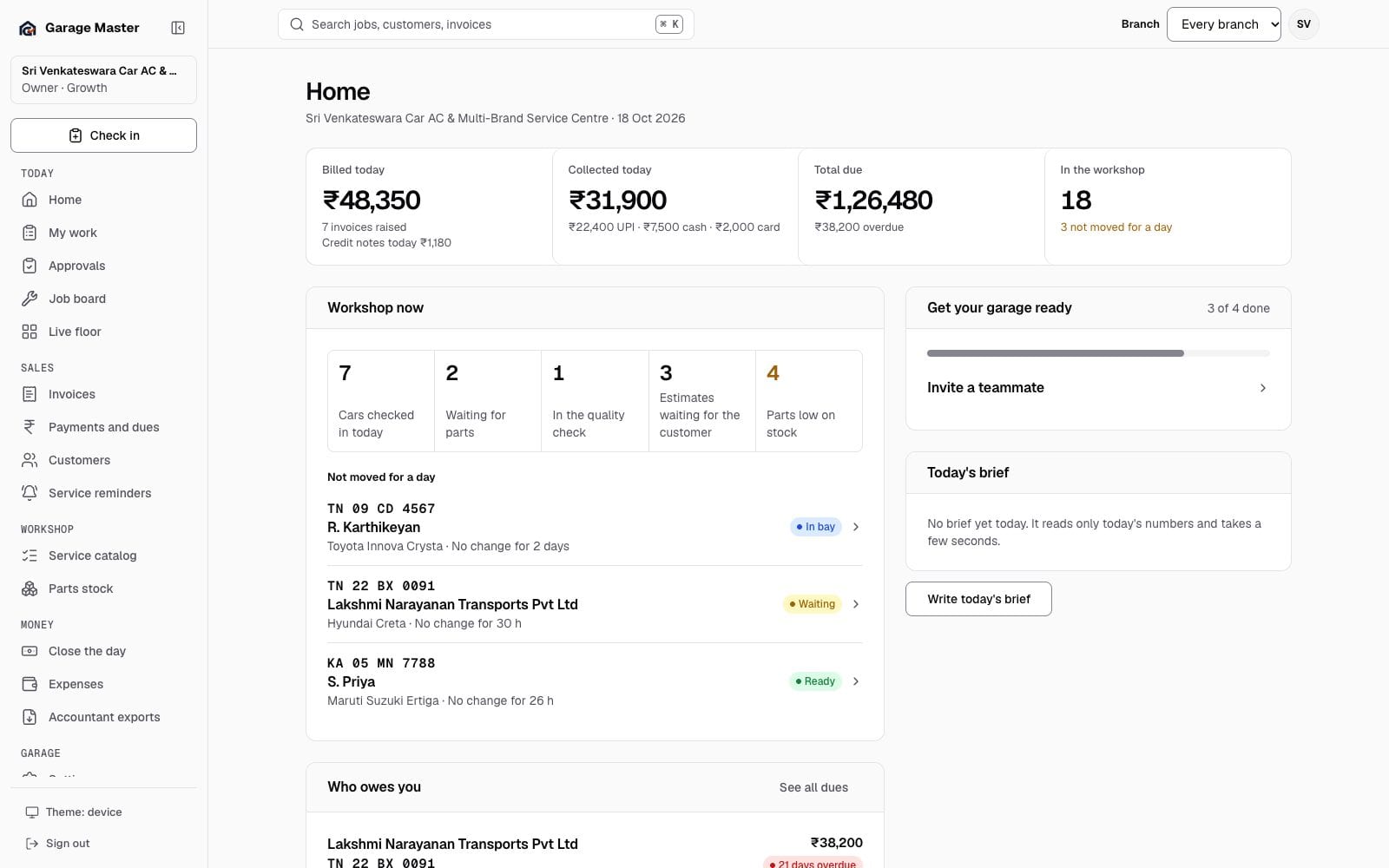
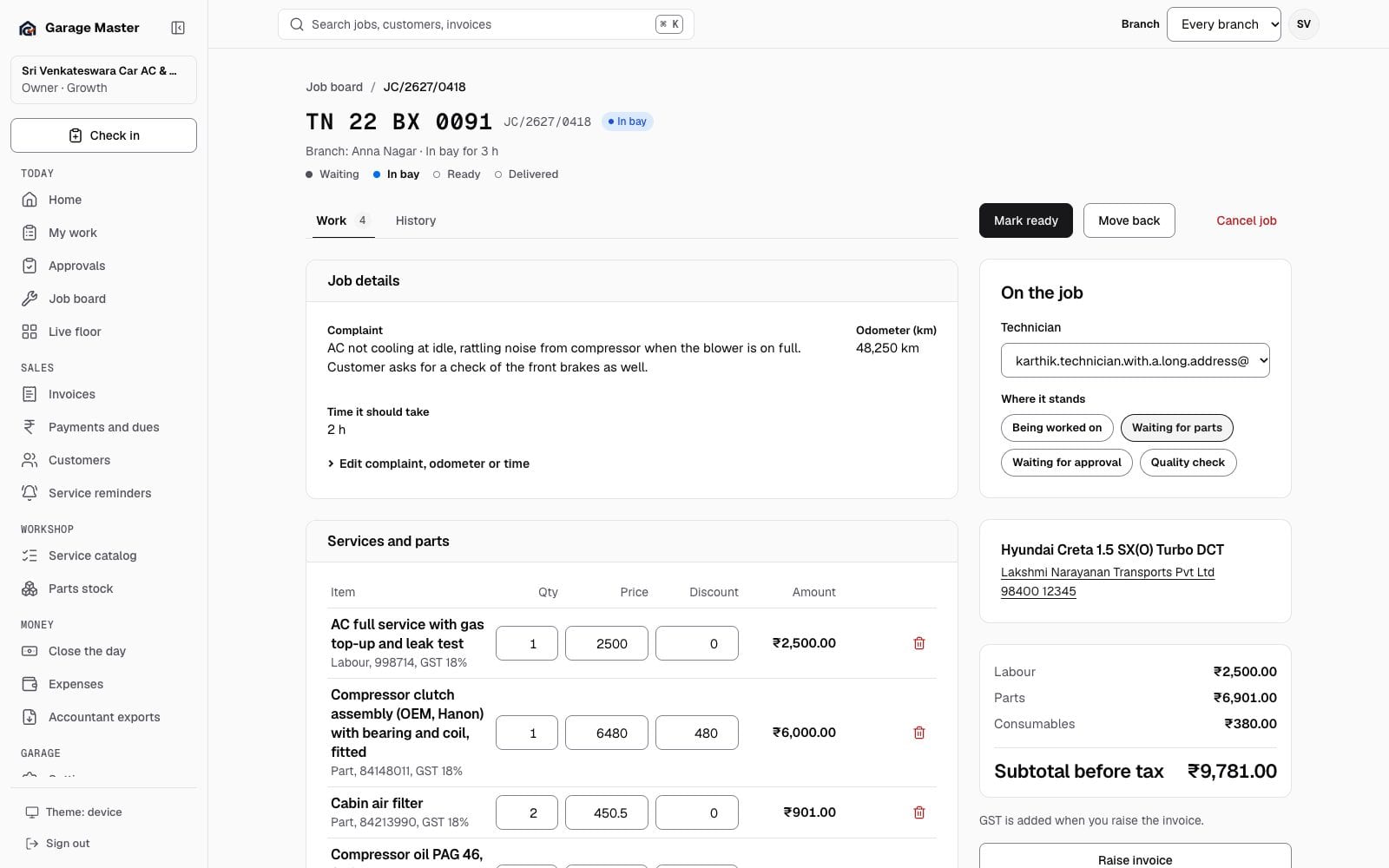
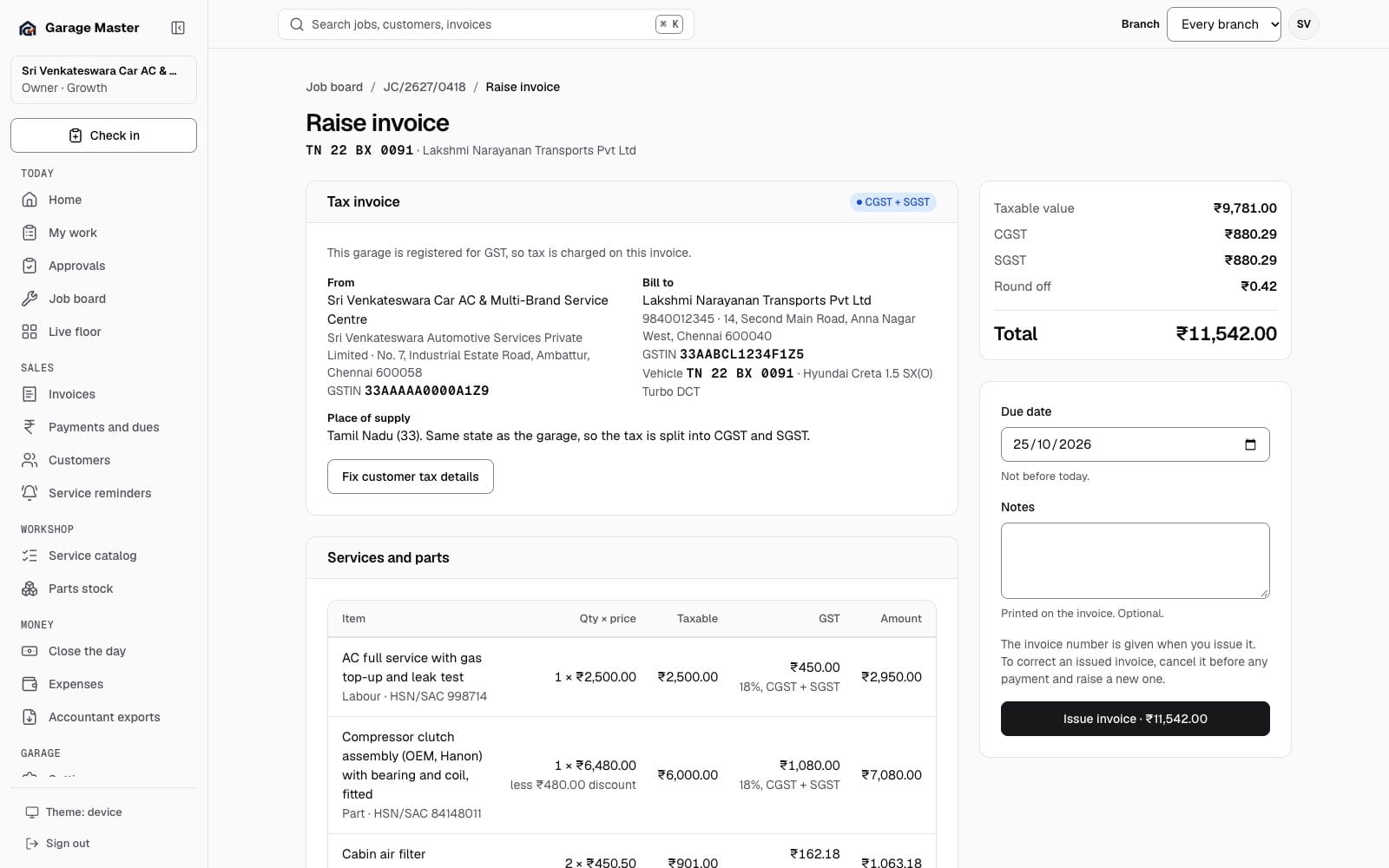
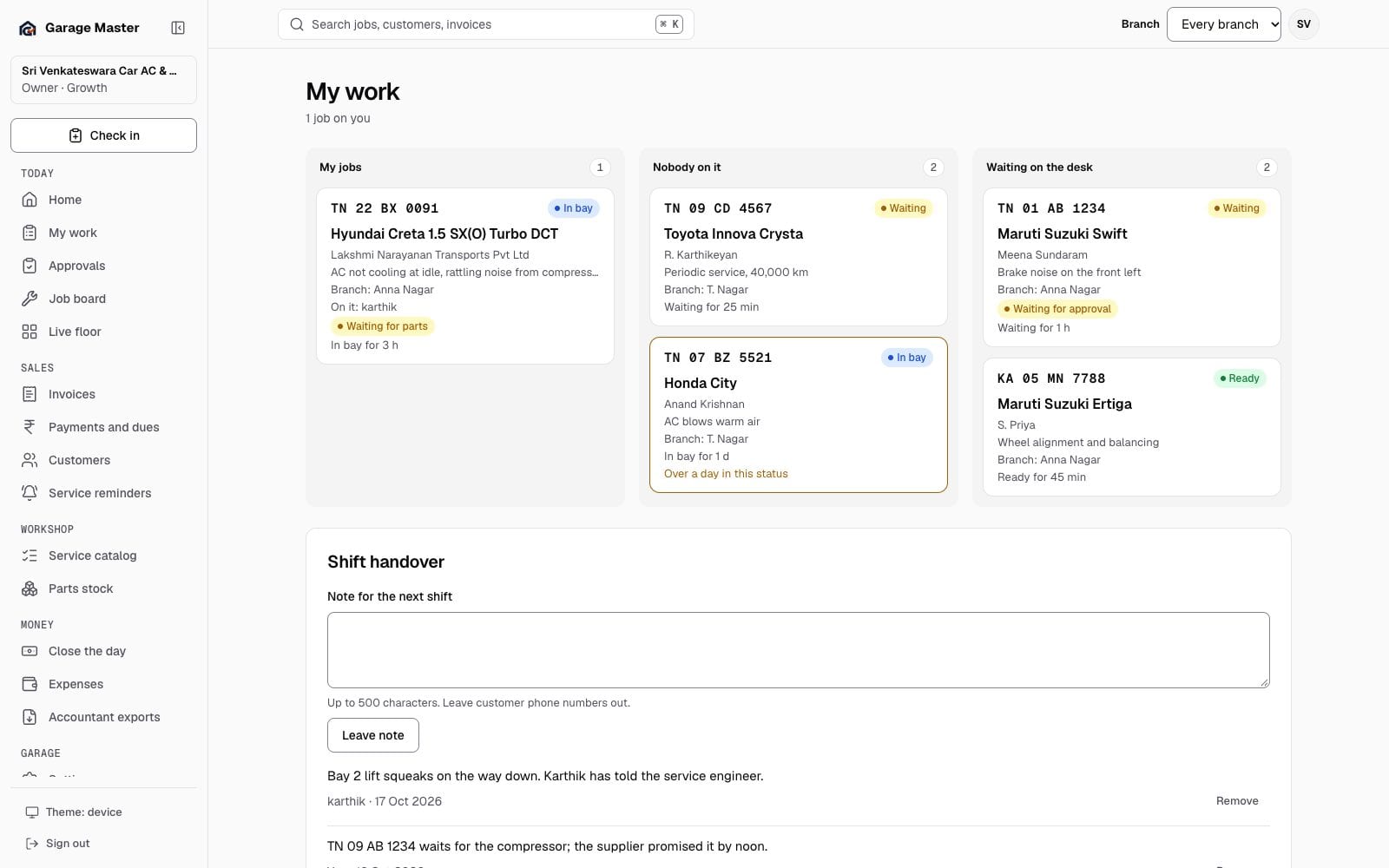
Synthetic records from the development gallery. The screens are real; the garage, people, vehicles and figures are not. Read what each capability does.
CUSTOM ERP
A garage ERP is more than billing. It is how a car, a part, a supplier bill and a job approval move through the day. We map the handoffs you already have, then build the screens, reports and integrations that remove the double entry.
Scoped from your workflow. It can reuse the working app's core, or connect around it where a module already earns its place.
Scope an ERP buildA concept map of the modules a custom ERP can connect. The actual scope follows your workshop.
Compare a current layout with a new bay or a second shift. The assumptions stay visible beside the picture.
3D WORKSHOP SIMULATION
Build a 3D plan of your bays, lifts, equipment and parking. Feed it the job states you already record to see where the work is, then test a change before you spend on it.
A custom operational model, not an engineering-validated digital twin. Realtime depends on the data feed and network; scenarios are planning aids, not guarantees.
AI MANAGEMENT & CRM
Garage work is a relationship: the first enquiry, the estimate, the parts wait, the service due, the payment follow-up. A custom CRM connects those moments to the same customer and vehicle record, with AI reading, drafting and checking under your rules.
AI recommends; a person approves. The current AI surfaces are read-only, and the calculator, tax rules and audit trail remain the source of truth for money.
The assistant drafts the next step; the garage decides it. Every suggestion points back to the record it read.
FOUNDING GARAGE AI CREDIT DRAW
Each month we select garages for a free AI-usage credit. It goes toward a supported custom AI build or Fuel Your Agents usage, so a smaller garage can test connected AI without carrying the full provider cost.
Entry is free by email. Credits are not cash, are not transferable and have no cash alternative. Provider usage above the credit and any applicable taxes remain the garage's responsibility.
A credit toward supported AI usage, not a cash prize and not a guarantee of results.
How a custom build runs
A custom build is a project, not a checkout. This is the shape that keeps it useful and keeps the risk visible.
Sixty minutes on how the garage actually runs: branches, desks, bays, handoffs, current software and the work that keeps slipping.
We map the data, permissions and integrations. You get a written scope with the first slice, assumptions and what is deliberately out.
A working slice on your records: one 3D view, one follow-up queue, one approval screen. We agree what done means before the build goes wider.
Staged rollout, training at the counter and in the bay, documentation and a support path. No big-bang cutover on a busy Monday.
Before the enquiry
No. It is a custom build. The working app records the job, bay and status data; a 3D view, a realtime floor display and scenario comparisons are scoped around your workshop, equipment and measurements.
Not necessarily. The first version can use the job states your team already records. Cameras, sensors or machine feeds are added only when the scope needs them and the site can support them.
No. It is an operational planning and communication model. Structural, electrical, fire or lift-safety decisions need the relevant engineers and approvals; the model is not a certification.
No. The current AI surfaces are read-only, and a custom AI layer is built with human approval for any money or stock change. Suggestions cite the record they came from; every action remains auditable.
Where the provider exposes a supported API and the account allows it. The scope states what is connected, what is manual and what stays outside the build.
Entry is free by email. We draw selected garages on a published date. A winner receives a credit toward supported AI usage on an agreed build or agent setup; it is not cash and has no cash alternative.
No. A custom layer can sit around the working app: the 3D view can read its job states, the CRM can use its customers and invoices, and the ERP can take over selected modules first. The migration path is part of the scope.
Your enquiry
Write to gmgaragemaster@gmail.com. The more you include, the faster we can tell you what is possible, what it depends on and what we would build first.
Custom work is quoted after the call. We do not promise a price, a date or a 3D model before the scope is agreed.
Please do not email API keys, passwords or customer records. We never ask for them by email.
The working app is available on a 14-day trial. Use it first, then decide whether a custom layer earns its place. Start the trial.
Your first bay
Tell us how the workshop actually runs. We will tell you what is worth building, what the working app already does, and where a custom layer earns its cost.